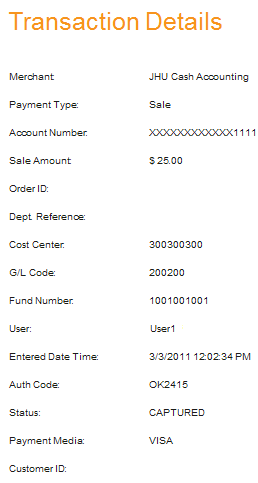
After you have searched for transactions and have a list, you can select each individual transaction. Clicking Select next to a particular transaction will show the transaction details. Once you have reviewed the transaction details click Back to perform a new search.
Void
If a transaction was processed but the batch wasn't settled yet, then this transaction can be voided. On the transaction details page click Void at the bottom right of the screen. The next screen will ask you to confirm the void. Click Confirm to continue or Cancel to go back. If the transaction is confirmed the transaction result will appear and a receipt can be emailed or printed. Click Close to close the screen.
Credit
If a transaction was processed and the batch was already settled, then this transaction can be credited back to the customer. A customer can be credited for either the full amount of the transaction or a partial amount. Enter the amount of the credit in the box labeled Credit Amount. If the transaction was already partially credited, then the remaining amount of the transaction will be displayed. On the transaction details page click Credit at the bottom right of the screen.
Transaction that can be Voided:
Transaction that can be Credited:
The next screen will ask you to confirm the credit. The screen will show a summary of the transaction information. If the transaction was done on the OSBP for an existing customer, the customer information will be separate from the transaction information. Click Confirm to continue or Cancel to go back. If the transaction is confirmed the transaction result will appear and a receipt can be emailed or printed. Click Close to close the screen.